
Free Clash and V2Ray Subscription Links, Updated Every 12 Hours (2026)
This page provides two free proxy subscription links, one for Clash-compatible clients and one for V2Ray-compatible clients. The subscription content is updated every 12 hours. These shared nodes are suitable for temporary tests and emergencies, not for a stable long-term connection or sensitive accounts.
Key facts
- Update interval: Subscription content is refreshed every 12 hours.
- Supported clients: Clash, Clash Verge, Clash Meta, v2rayN, v2rayNG, and compatible software.
- Reasonable uses: Temporary browsing, client testing, and short emergency access.
- Unsuitable uses: Banking, important-account sign-in, livestreaming, e-commerce operations, or other production work.
- Basic rule: Do not enter sensitive information, do not depend on one node, and disable the proxy when the test is over.
Read before use
Free subscriptions are generally shared by many users. Speed, availability, privacy practices, and egress-IP reputation are not guaranteed. These nodes are collected from public sources for learning and testing. Follow the laws that apply to you and assess the risks yourself.
Subscription addresses
Choose the format supported by the client. Paste a subscription link only into a client you trust; do not submit it to an unknown online conversion service.
| Format | Typical clients | Update interval |
|---|---|---|
| Clash | Clash Verge, Clash Meta, OpenClash, and compatible clients | Every 12 hours |
| V2Ray | v2rayN, v2rayNG, and compatible clients | Every 12 hours |
Free Clash subscription
https://www.ermao.net/sub/clash/ermao.netFree V2Ray subscription
https://www.ermao.net/sub/v2ray/ermao.netHow to import a subscription
Menu names vary by client, but the workflow is usually:
- Copy the Clash or V2Ray link that matches the client.
- Open the client's Subscriptions, Configurations, or Profiles page.
- Add a subscription, paste the link, and refresh or update it.
- Wait for the node list to load, then select a node that responds and has reasonable latency.
- Enable the System Proxy or VPN connection and test in a browser.
For illustrated instructions by device:
- Import a Clash Meta subscription on Android
- Use Clash Verge on Windows, Linux, and macOS
- Use Shadowrocket on iPhone and iPad
How to test a free node
Do not rely only on the latency number displayed by the client. A node that responds to a latency probe may still fail during normal browsing, video playback, or account sign-in.
- Refresh the subscription: Make sure the client loaded the current node list.
- Test basic connectivity: Open an ordinary website to rule out a local outage or disabled system proxy.
- Change nodes: When one node repeatedly fails, try a different region or route.
- Observe stability: Test browsing and video for several minutes instead of trusting one speed-test result.
- Watch account challenges: Stop using the node if an important platform repeatedly requests verification or a new login.
Observed behavior
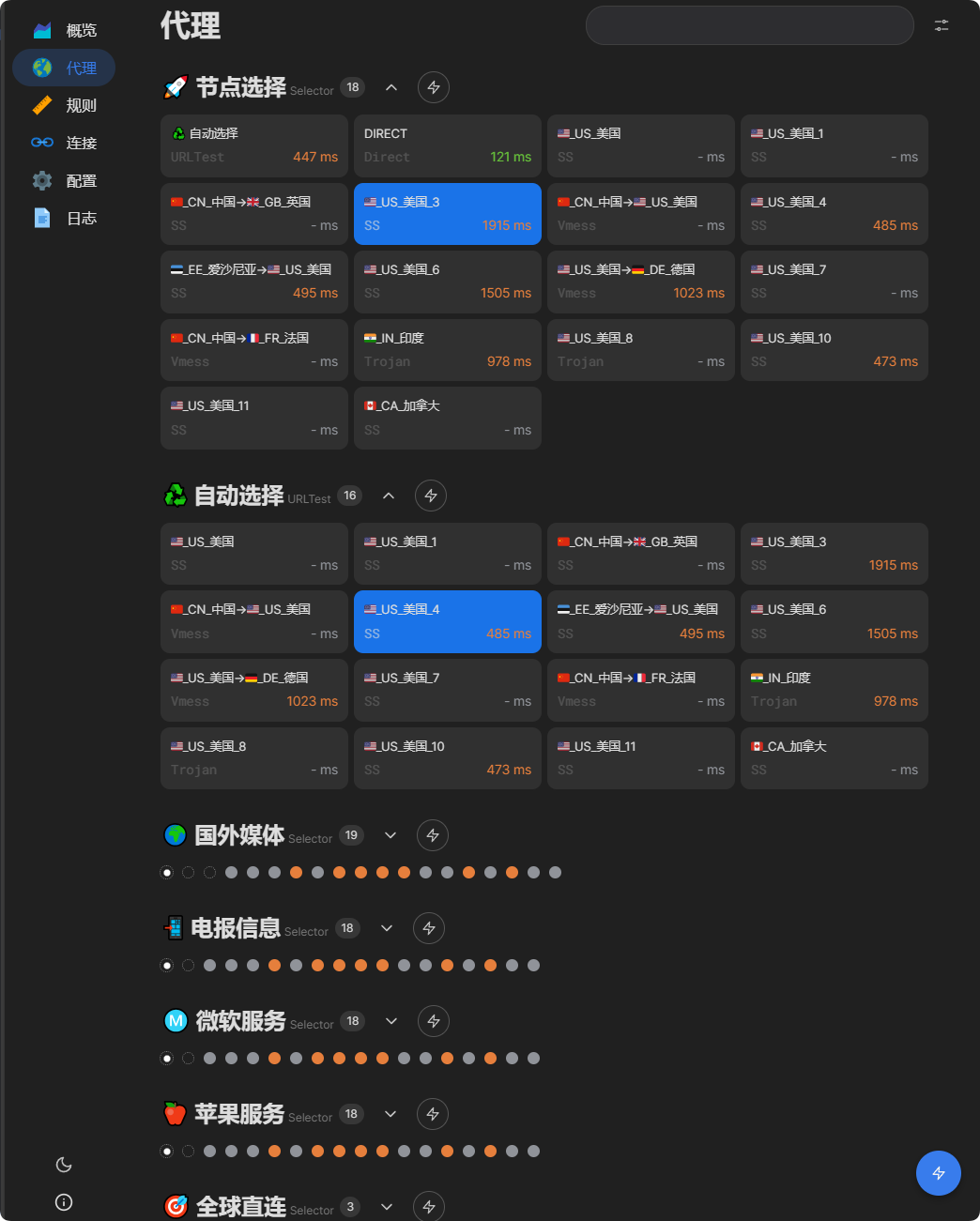
Free-node performance changes with user load, time of day, route conditions, and the local network. Off-peak tests may be sufficient for ordinary pages and short video checks. During the evening peak, congestion, disconnections, and dead nodes are more common.
The following screenshots show only the state at the test time and are not a promise of continuing availability.
Risks of a free proxy service
Unpredictable speed and availability
Many people can share the same node. Congestion, packet loss, disconnections, and unannounced node replacement are common, especially at peak time.
Shared egress IPs can trigger risk controls
If previous users abused an egress IP, a website may require additional verification, limit sign-ins, or reject traffic. The fact that a node opens a public page does not make the address safe for a valued account.
Unknown data-handling practices
The operator, infrastructure, and logging policy of a free service are often unclear. HTTPS normally protects application content in transit, but a proxy can still observe connection metadata and destinations. Do not use an unknown free node for banking, payments, company administration, private files, or other sensitive work.
Creator and e-commerce accounts face higher operational risk
Video, livestreaming, advertising, and e-commerce platforms can evaluate IP reputation, device information, region, and sign-in behavior together. Rapid changes between shared or abused addresses may trigger verification, throttling, or an account alert. Use a controlled, geographically stable network for these accounts.
| Use case | Recommended? | Reason |
|---|---|---|
| Temporary browsing or client testing | Acceptable for a short test | No cost, but unreliable |
| Watching public video | Acceptable temporarily | Peak-hour buffering and outages are possible |
| Signing in to an important account | No | Shared IP reputation can trigger security checks |
| Banking, payments, or sensitive files | No | Operator and network trust are unknown |
| Livestreaming, e-commerce, or creator work | No | IP quality and region changes can trigger platform controls |
| Long-term work or production | No | No service or stability guarantee |
Frequently asked questions
How do I use a free proxy subscription link?
Choose the Clash or V2Ray format that matches the client. Paste it into the client's Subscriptions, Configurations, or Profiles page and refresh it. Select a loaded node, then enable the system proxy or VPN connection.
Is a free subscription suitable for long-term use?
No. Speed, availability, operator behavior, and egress-IP reputation are difficult to verify. Use it for a temporary test or emergency. For longer use, evaluate a provider with clear support and keep an independent backup.
Why can the node connect but not open a website?
The node may be dead, too slow, blocked by the destination, or incompatible with the current client core. The local network may also be down, or the system proxy may be disabled. Refresh the subscription, change nodes, and check the connection mode.
What is the difference between Clash and V2Ray subscriptions?
The formats are designed for different client families. Choose Clash for Clash Verge, Clash Meta, or OpenClash. Choose V2Ray for v2rayN or v2rayNG. A client cannot necessarily parse the other format directly.
What should I do when the subscription will not update?
Confirm that the network works and the complete link was copied. Restart the client and try the update again. If it still fails, test from another network. When the subscription imports but every node is dead, wait for the next refresh or use another connection.
Can I sign in to an important account through a free node?
It is not recommended. A shared address may carry an abuse history and trigger account controls. Use a trusted, stable network for banking, payments, workplace administration, e-commerce, and creator accounts.
Further reading
- Proxy subscriptions: purchasing, importing, and avoiding common mistakes
- 2026 proxy-service recommendations and reviews
- How to assess IPLC, IEPL, CN2, BGP, and public routes
Summary
The free Clash and V2Ray subscriptions on this page are updated every 12 hours and intended for temporary testing. Use the format that matches the client. If the nodes fail, refresh the subscription, try another node, and verify the system-proxy setting.
For better stability, clearer support, and a more accountable operator, see the maintained proxy-service review list and begin with a monthly plan rather than a large prepaid commitment.