
Advanced Clash Rules: Direct Routing, Proxy Routing, and Domain Blocking
A Clash profile without suitable routing rules may send local websites through a distant proxy, waste subscription data, or use an unexpected route for a particular service. This guide uses the open-source Loyalsoldier rules and Clash Verge Rev's subscription extensions to route local traffic directly, proxy selected external traffic, and reject listed advertising or tracking domains.
Routing rules can reduce unnecessary route changes and improve consistency. They cannot guarantee that an account will never be restricted, make a data-center IP look residential, or ensure that every streaming service accepts the selected exit IP.
Prerequisites:
- Windows, macOS, or Linux: Install Clash Verge Rev
- Android: Install Clash for Android
- Subscription: 2026 proxy-service guide
What Clash rules do
Clash evaluates traffic against an ordered list of rules:
| Traffic | Action | Result |
|---|---|---|
| 🟢 Listed local domains and IP ranges | DIRECT | Uses the original network |
| 🔴 Listed external services | PROXY | Uses the selected proxy policy |
| 🛑 Listed advertising and tracking domains | REJECT | Refuses the matching request |
Without a profile appropriate to the user's network:
- shopping, messaging, or video traffic intended to stay local may take a distant proxy route;
- one service may see unexpected exit locations when nodes are switched frequently;
- a site not covered by the rules follows the final fallback policy.
Rules act like an ordered routing table. They determine where a request goes; they do not change the reputation of the chosen IP.
How matching works
Clash checks rules from top to bottom:
youtube.commatches a proxy rule and usesPROXY.taobao.commatches a direct rule and usesDIRECT.- An unmatched domain follows the final fallback policy supplied by the profile.
The order matters. A more specific rule must normally appear before a broad rule that would otherwise match the same traffic.
Rule source: Loyalsoldier/clash-rules

The source article recommends Loyalsoldier/clash-rules. At its February 2026 snapshot, the repository had nearly 30,000 GitHub stars.
The project:
- combines community-maintained domain and IP datasets, including separate Apple, Google, Telegram, private-network, and mainland-China lists;
- uses GitHub Actions to rebuild published data regularly—the source article reports a daily 6:30 a.m. schedule;
- publishes formats usable by compatible Clash cores and clients.
Compatibility depends on the exact Clash core and extension mechanism. Test the generated configuration in the client version you actually use.
Repository: https://github.com/Loyalsoldier/clash-rules
Configure the rules in three steps
This workflow is checked against Clash Verge Rev v2.5.8. Other clients need their own syntax and interface checks.
Back up before adding rules
Back up subscription extensions, scripts, and custom rules, and record the existing proxy-group names. Preserve existing overrides and avoid editing the downloaded profile that subscription refreshes replace. The steps below target one selected subscription.
The official extension guide moved prepend/append operations into the subscription editor in v1.7.x. The v2.5.8 Merge implementation does not interpret prepend-rule-providers or prepend-rules as insertion commands. A rules list in extension YAML replaces the whole list; it is not an append operation.
Step 1: add providers to the selected subscription
Right-click the active subscription and open its extension configuration. Merge the following rule-providers entries with existing content. If the top-level key already exists, add children beneath it instead of repeating the key. Check that the local-ls- names and cache paths are unused; if they conflict, change the prefix in both definitions and references.
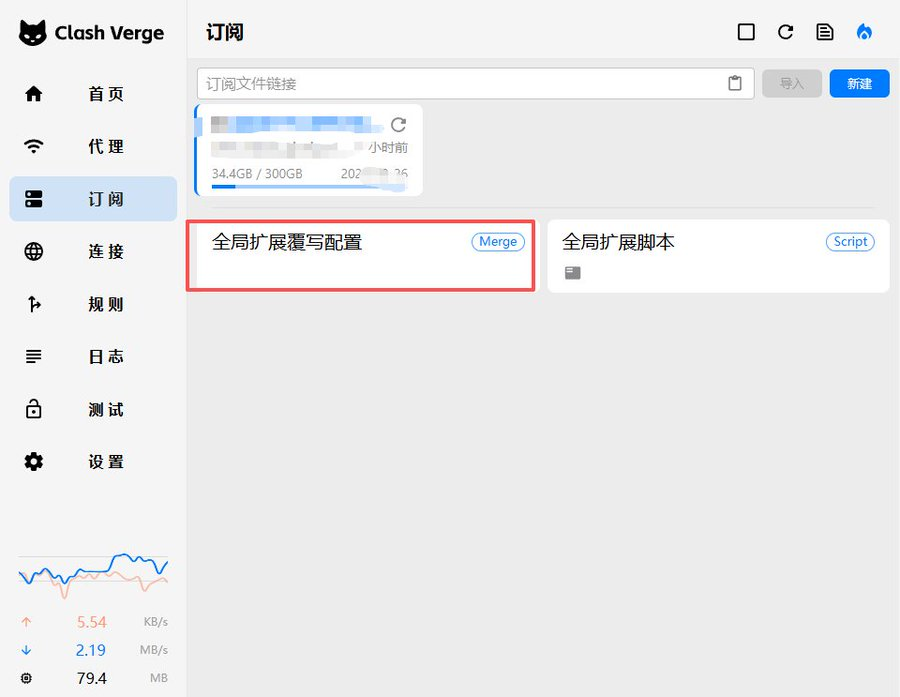
This older screenshot shows a global entry point. The workflow here uses the selected subscription's extension configuration.
rule-providers:
  local-ls-reject:
    type: http
    behavior: domain
    url: "https://cdn.jsdelivr.net/gh/Loyalsoldier/clash-rules@release/reject.txt"
    path: ./ruleset/local-ls-reject.yaml
    interval: 86400

  local-ls-icloud:
    type: http
    behavior: domain
    url: "https://cdn.jsdelivr.net/gh/Loyalsoldier/clash-rules@release/icloud.txt"
    path: ./ruleset/local-ls-icloud.yaml
    interval: 86400

  local-ls-apple:
    type: http
    behavior: domain
    url: "https://cdn.jsdelivr.net/gh/Loyalsoldier/clash-rules@release/apple.txt"
    path: ./ruleset/local-ls-apple.yaml
    interval: 86400

  local-ls-google:
    type: http
    behavior: domain
    url: "https://cdn.jsdelivr.net/gh/Loyalsoldier/clash-rules@release/google.txt"
    path: ./ruleset/local-ls-google.yaml
    interval: 86400

  local-ls-proxy:
    type: http
    behavior: domain
    url: "https://cdn.jsdelivr.net/gh/Loyalsoldier/clash-rules@release/proxy.txt"
    path: ./ruleset/local-ls-proxy.yaml
    interval: 86400

  local-ls-direct:
    type: http
    behavior: domain
    url: "https://cdn.jsdelivr.net/gh/Loyalsoldier/clash-rules@release/direct.txt"
    path: ./ruleset/local-ls-direct.yaml
    interval: 86400

  local-ls-private:
    type: http
    behavior: domain
    url: "https://cdn.jsdelivr.net/gh/Loyalsoldier/clash-rules@release/private.txt"
    path: ./ruleset/local-ls-private.yaml
    interval: 86400

  local-ls-telegramcidr:
    type: http
    behavior: ipcidr
    url: "https://cdn.jsdelivr.net/gh/Loyalsoldier/clash-rules@release/telegramcidr.txt"
    path: ./ruleset/local-ls-telegramcidr.yaml
    interval: 86400

  local-ls-cncidr:
    type: http
    behavior: ipcidr
    url: "https://cdn.jsdelivr.net/gh/Loyalsoldier/clash-rules@release/cncidr.txt"
    path: ./ruleset/local-ls-cncidr.yaml
    interval: 86400

  local-ls-lancidr:
    type: http
    behavior: ipcidr
    url: "https://cdn.jsdelivr.net/gh/Loyalsoldier/clash-rules@release/lancidr.txt"
    path: ./ruleset/local-ls-lancidr.yaml
    interval: 86400

  local-ls-applications:
    type: http
    behavior: classical
    url: "https://cdn.jsdelivr.net/gh/Loyalsoldier/clash-rules@release/applications.txt"
    path: ./ruleset/local-ls-applications.yaml
    interval: 86400
Step 2: prepend references in Edit Rules
Following the official rules guide, right-click the same subscription, open Edit Rules, and add the following in the prepend area, preserving their order. Where the editor uses separate fields, enter the type, provider name, and policy separately. These are resulting rule strings, not a rules list to paste into extension YAML.
Replace every YOUR_EXISTING_GROUP with an exact proxy-group name from this subscription. PROXY is not a built-in group present in every profile; DIRECT and REJECT are built-in policies. Review the effect of prepending on existing routing and retain the original rules and final MATCH.
RULE-SET,local-ls-applications,DIRECT
RULE-SET,local-ls-private,DIRECT
RULE-SET,local-ls-reject,REJECT
RULE-SET,local-ls-icloud,DIRECT
RULE-SET,local-ls-apple,DIRECT
RULE-SET,local-ls-google,YOUR_EXISTING_GROUP
RULE-SET,local-ls-proxy,YOUR_EXISTING_GROUP
RULE-SET,local-ls-direct,DIRECT
RULE-SET,local-ls-lancidr,DIRECT
RULE-SET,local-ls-cncidr,DIRECT
RULE-SET,local-ls-telegramcidr,YOUR_EXISTING_GROUP
GEOIP,LAN,DIRECT
GEOIP,CN,DIRECT
The summary uses upstream names; actual definitions and references use the local-ls- prefix. PROXY in the table means your verified existing group.
Rule summary:
| Rule set | Match type | Action | Intended traffic |
|---|---|---|---|
applications | Local applications | DIRECT | Listed P2P or local applications |
private | Private domains | DIRECT | localhost and local-network names |
reject | Advertising/tracking domains | REJECT | Requests matching the maintained block list |
icloud / apple | Apple services | DIRECT | iCloud, App Store, and related domains listed by the source |
google | Google services | PROXY | Google Search, YouTube, and related listed domains |
proxy | Common external domains | PROXY | Listed services such as X, Telegram, or Netflix |
direct | Local domains | DIRECT | Listed mainland-China domains |
cncidr / lancidr | IP ranges | DIRECT | Listed mainland-China and LAN ranges |
telegramcidr | Telegram IP ranges | PROXY | Telegram address ranges in the provider |
Review the lists before using them in a high-sensitivity environment. A third-party list can contain errors, change over time, or block a domain required by another app.
Step 3: apply and verify
Save and reapply the selected subscription using the installed version's controls. Check configuration validation, core loading, and provider downloads; saving a file alone does not prove it is active. Recheck after subscription refresh or switching profiles. Restore the backup if loading fails.
Optional: a script for selected subscriptions
The official Script mechanism can apply the same additions to several named subscriptions. This is an alternative to the two steps above, not another layer to add on top. Back up any existing global script and integrate the logic into its existing main instead of clearing it or defining a second entry point. Replace the policies keys with actual profile names and the values with existing group names in each profile. Unlisted profiles are returned unchanged.
This example preserves existing providers, rule order, and fallback rules, prepending only new entries. A provider-name conflict or missing group produces an error rather than overwriting existing data. Choose one method or a separate prefix if another extension already uses these names.
function main(config, profileName) {
  const policies = {
    "YOUR_PROFILE_A": "YOUR_EXISTING_GROUP_A",
    "YOUR_PROFILE_B": "YOUR_EXISTING_GROUP_B"
  };
  if (!Object.prototype.hasOwnProperty.call(policies, profileName)) return config;
  const policy = policies[profileName];
  if (!Array.isArray(config.rules) || !Array.isArray(config["proxy-groups"]) ||
      !config["proxy-groups"].some(group => group.name === policy)) {
    throw new Error("Check existing rules and the selected proxy group");
  }
  const existing = config["rule-providers"] || {};
  if (typeof existing !== "object" || Array.isArray(existing)) {
    throw new Error("Invalid rule-providers object");
  }
  const specs = [
    ["applications", "classical", "DIRECT"],
    ["private", "domain", "DIRECT"],
    ["reject", "domain", "REJECT"],
    ["icloud", "domain", "DIRECT"],
    ["apple", "domain", "DIRECT"],
    ["google", "domain", policy],
    ["proxy", "domain", policy],
    ["direct", "domain", "DIRECT"],
    ["lancidr", "ipcidr", "DIRECT"],
    ["cncidr", "ipcidr", "DIRECT"],
    ["telegramcidr", "ipcidr", policy]
  ];
  const additions = {};
  const rules = [];
  for (const [name, behavior, target] of specs) {
    const key = "local-ls-" + name;
    if (Object.prototype.hasOwnProperty.call(existing, key)) {
      throw new Error("Provider name already exists: " + key);
    }
    additions[key] = {
      type: "http", behavior,
      url: "https://cdn.jsdelivr.net/gh/Loyalsoldier/clash-rules@release/" + name + ".txt",
      path: "./ruleset/" + key + ".yaml", interval: 86400
    };
    rules.push("RULE-SET," + key + "," + target);
  }
  rules.push("GEOIP,LAN,DIRECT", "GEOIP,CN,DIRECT");
  config["rule-providers"] = Object.assign({}, existing, additions);
  config.rules = rules.concat(config.rules);
  return config;
}
Later subscription extensions can still change the global script's output, so inspect the final configuration. The example is checked statically and with logic tests, not claimed to have been tested inside your client or network.
Expected effects
When the rules match correctly:
- listed local sites use the direct route rather than a distant proxy;
- listed streaming and external services use the selected proxy policy;
- Telegram's listed IP ranges use the proxy;
- domains in the
rejectlist are refused.
These effects depend on the accuracy of the lists and the quality of the selected node. They do not guarantee Netflix access, TikTok availability, instant messaging, or complete advertisement blocking.
Verify the merged configuration
- Open Settings.
- Find Verge Advanced Settings, then open Current Configuration.
- Inspect the final merged YAML.
Labels vary by version; use the view of the actual running configuration. Confirm:
- Original providers remain alongside
local-ls-*, and downloads succeed; names alone do not prove success. - New rule references are in the intended order, original rules and the final
MATCHremain, and everyRULE-SEThas a provider definition. - Custom policies reference real proxy groups and core validation/loading logs have no errors.
- A non-sensitive test request shows the expected matched rule, policy, and exit in Connections or logs. Inspect a new connection because existing connections may retain their previous route.

Use Rule Mode
The routing engine applies these decisions only in Rule mode. Global and Direct modes bypass the intended split-routing behavior.
Frequently asked questions
A website stops opening after the rules are added
It may have matched the wrong direct, proxy, or reject rule. Open Clash Verge Rev's Connections panel, inspect the rule shown for the domain, then add a more specific custom rule before the conflicting one.
Can Clash on a phone use custom rules?
Compatible Android Clash clients can use custom rules, although the interface differs. See Clash for Android.
On iOS, see Shadowrocket and the Shadowrocket rules guide.
Do these providers update automatically?
interval: 86400 asks the client to refresh each provider every 24 hours. The upstream repository also rebuilds its release data on a regular schedule. Automatic refresh still depends on the client being able to reach the provider URL.